How to Generate Comics and Anime Using Z-Image Turbo?
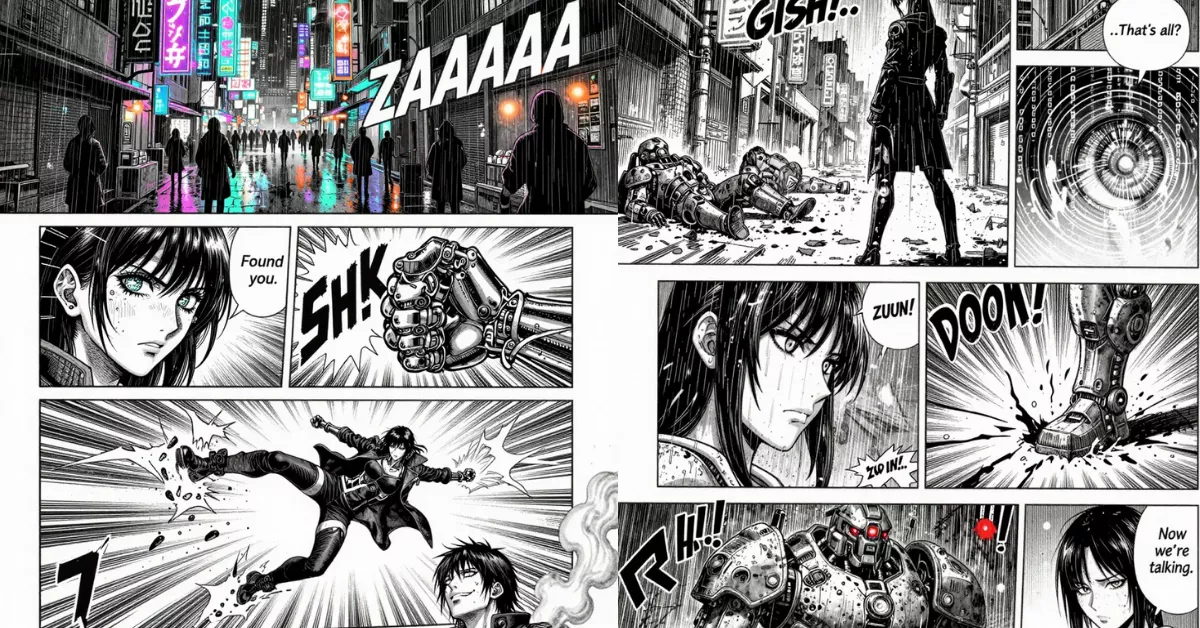
I came across something that genuinely surprised me, and I want to walk through it in a detailed and structured way. When I tried Z-Image-Turbo, the experience immediately stood out. I realized that it could generate a variety of images, including comics, and I found myself thinking that this model is what Stable Diffusion 3.5 should have been. That is how strong the reaction was. I felt blown away in the moment, and that feeling stayed with me as I explored it more.
My excitement increased when I discovered that it could even handle multi-panel comic pages. I kept imagining the future where this kind of output could be refined even further. I felt that if the model is further fine-tuned on comics, it would handle them pretty well. The thought that kept coming back to me was that we are almost there. Soon, we can make our own manga.
I tested all of this on my system with an RTX3090, generating images at 1920x1200. The generation process took 23 seconds, which I found incredible.
In this article, I am sharing every detail, including the full prompts exactly as they were written. My goal is to keep everything intact while presenting it in a clean structure that makes it easier to understand and use.
Hardware and Generation Details
Here are the exact details mentioned when testing Z-Image-Turbo:
- GPU used: RTX3090
- Image resolution: 1920x1200
- Generation time: 23 seconds
- Reaction: “insane” speed
These technical details matter because they give a realistic expectation of what the model can deliver in practical use.
Prompt Used for Page 1
This is the complete and original prompt written by Kimi2-thinking. All parts are preserved exactly as provided.
Page Overview
A dynamic manga page layout featuring a cyberpunk action sequence, drawn in a gritty seinen style. The page uses stark black and white ink with heavy cross-hatching, Ben-Day dot screentones, and kinetic speed lines.
Below is a step-by-step breakdown of each panel exactly as described.
Step-by-step Guide: Page 1 Panels
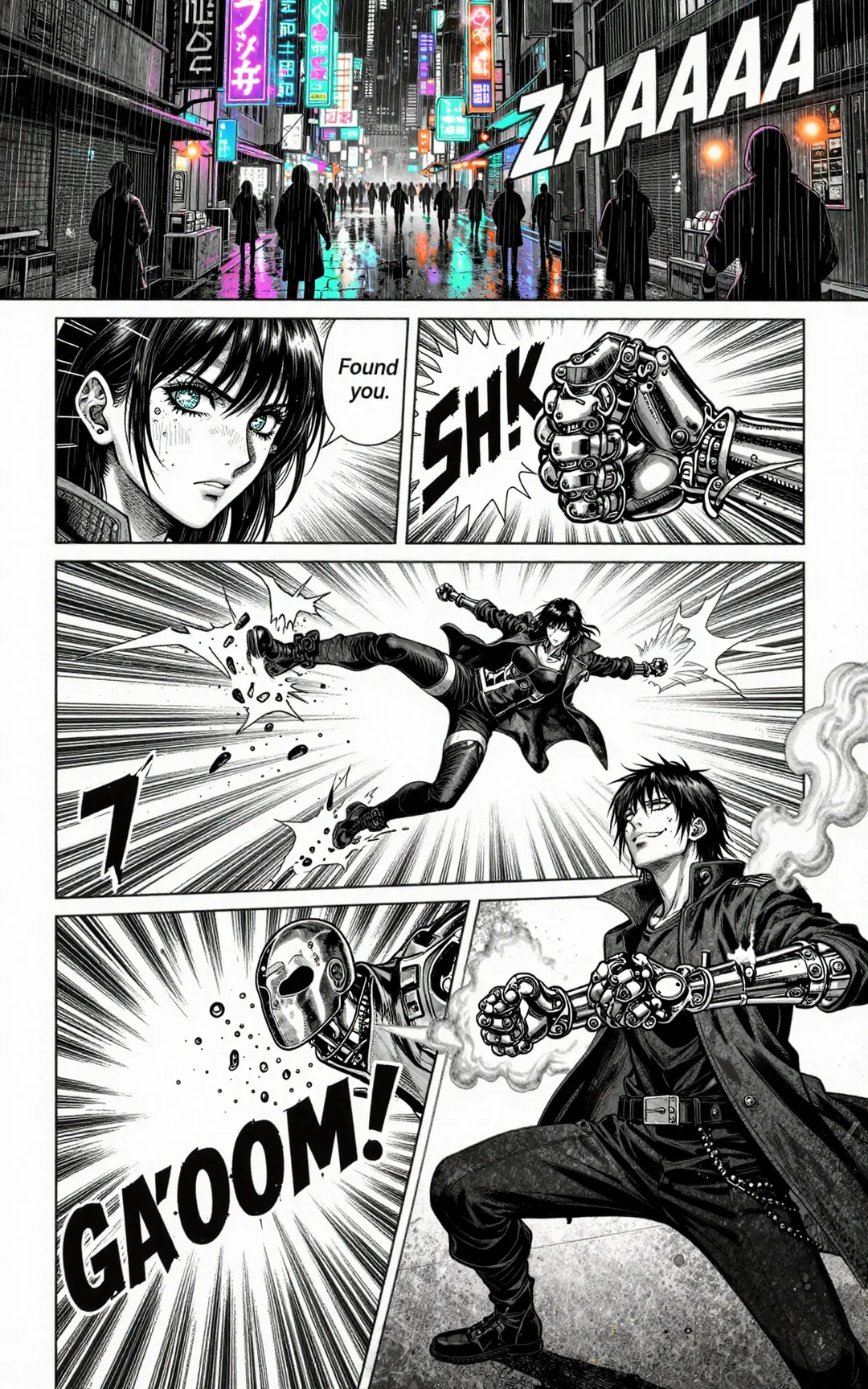
Panel 1 (Top, wide establishing shot)
A bustling neon-drenched alleyway in a dystopian metropolis. Towering holographic kanji signs flicker above, casting electric blue and magenta light on wet pavement. The perspective is from a high angle, looking down at the narrow street crowded with food stalls and faceless pedestrians. In the foreground, a mysterious figure in a long coat pushes through the crowd. Heavy rainfall is indicated with fast vertical motion lines and white-on-black sound effects: "ZAAAAAA" across the panel.
Panel 2 (Below Panel 1, left side, medium close-up)
The figure turns, revealing a young woman with sharp eyes and a cybernetic eye gleaming with data streams. Her face is half-shadowed, jaw clenched. The panel border is irregular and jagged, suggesting tension. Detailed hatching defines her cheekbones, and concentrated screentones create deep shadows. Speed lines radiate from her head. A small speech bubble: "Found you."
Panel 3 (Below Panel 1, right side, horizontal)
A gloved hand clenches into a fist, hydraulic servos in the knuckles activating with "SH-CHNK" sound effects. The cyborg arm is exposed, showing chrome plating and pulsing fiber-optic cables. Extreme close-up with dramatic foreshortening, deep black shadows, and white highlights catching on metal grooves. Thin panel frame.
Panel 4 (Center, large vertical panel)
The woman explodes into action, launching from a crouch. Dynamic low-angle perspective (worm's eye view) captures her mid-leap, coat billowing, one leg extended for a flying kick. Her mechanical arm is pulled back, crackling with electricity rendered as bold, jagged white lines. Background dissolves into pure speed lines and speed blurs. The panel borders are slanted diagonally for energy.
Panel 5 (Bottom left, inset)
Impact frame—her boot connects with a chrome helmet. The enemy's head snaps back, shards of metal flying. Drawn with extreme speed lines radiating from the impact point, negative space reversed (white background with black speed lines). "GA-KOOM!" sound effect in bold, cracked letters dominates the panel.
Panel 6 (Bottom right, final panel)
The woman lands in a three-point stance on the rain-slicked ground, steam rising from her overheating arm. Low angle shot, her face is tilted up with a fierce smirk. Background shows fallen assailants blurred. Heavy blacks in the shadows, screentones on her coat, and a single white highlight on her cybernetic eye. Panel border is clean and solid, providing a sense of finality.
Prompt Used for Page 2
Below is the full second-page prompt exactly as provided.
PAGE 2
Step-by-step Guide: Page 2 Panels
Panel 1 (Top, wide shot)
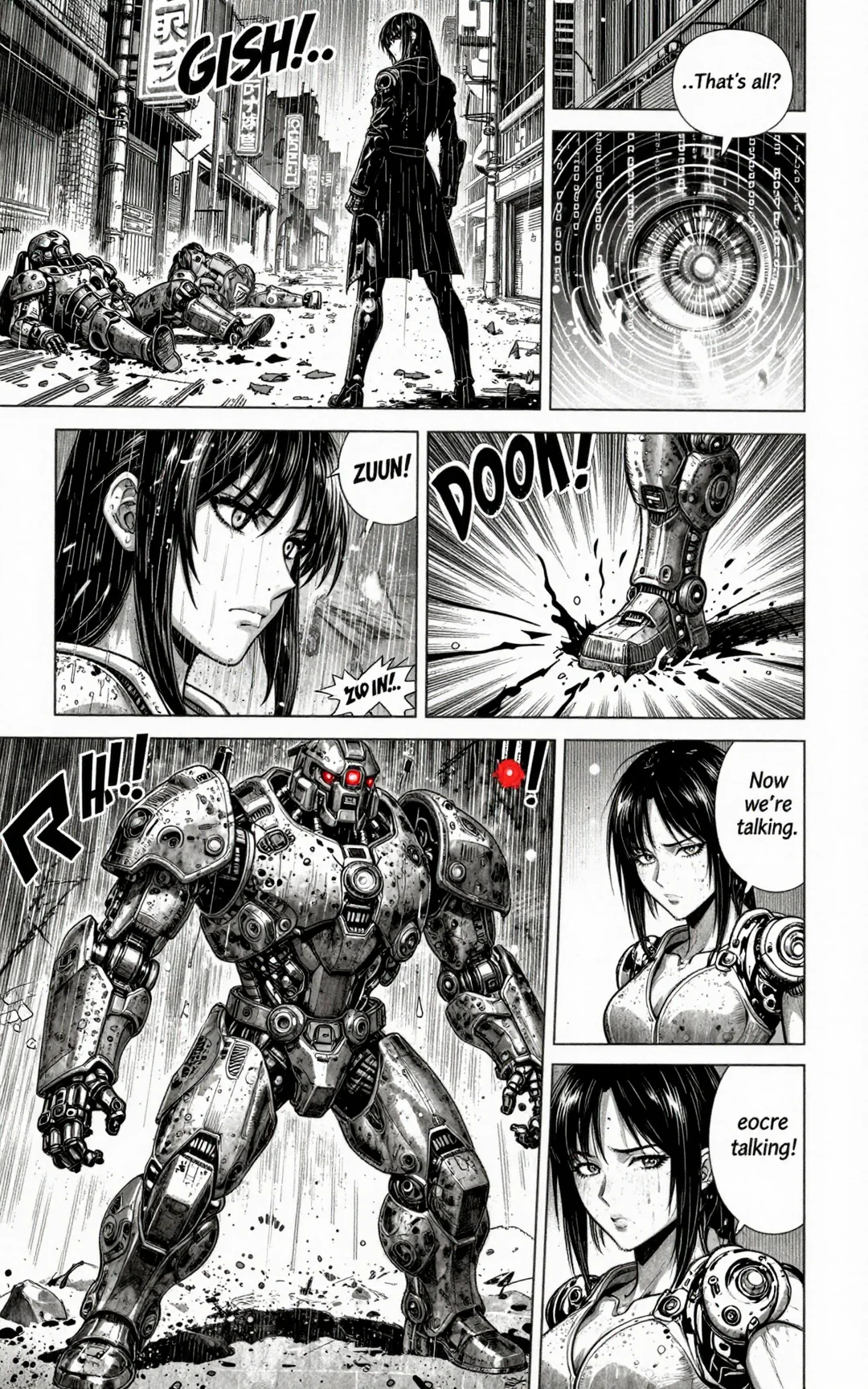
The cyborg woman rises to her full height, rainwater streaming down her coat. Steam continues to vent from her arm's exhaust ports with thin, wispy lines. She cracks her neck, head tilted slightly. The perspective is eye-level, showing the alley stretching behind her with three downed assailants lying in twisted heaps. Heavy cross-hatching in the shadows under the neon signs. Sound effect: "GISHI..." (creak). Her speech bubble, small and cold: "...That's all?"
Panel 2 (Inset, overlapping Panel 1, bottom right)
A tight close-up of her cybernetic eye whirring as the iris aperture contracts. Data streams and targeting reticles flicker in her vision, rendered as thin concentric circles and scrolling vertical text (binary code or garbled kanji) in the screentone. The pupil glows with a faint white highlight. No border, just the eye detail floating over the previous panel.
Panel 3 (Middle left, vertical)
Her head snaps to the right, eyes wide, rain droplets flying off her hair. Dynamic motion lines arc across the panel. In the blurred background, visible through the downpour, a massive silhouette emerges—heavy tactical armor with a single glowing red optic sensor. The panel border is cracked and fragmented. Sound effect: "ZUUN!" (rumble).
Panel 4 (Middle right, small)
A booted foot stomps down, cracking the concrete. Thick, jagged cracks radiate from the impact. Extreme foreshortening from a low angle, showing the weight and power. The armor plating is covered in warning stickers and weathered paint. Sound effect: "DOON!" (crash).
Panel 5 (Bottom, large horizontal spread)
Full reveal of the enemy—an 8-foot tall enforcer droid, bulky and asymmetrical, with a rotary cannon arm and a rusted riot shield. It looms over her, filling the panel. The perspective is from behind the woman's shoulder, low angle, emphasizing its size. Rain sheets down its chassis, white highlights catching on metal edges. In the far background, more red eyes glow in the darkness. The woman's shadow stretches small before it. Sound effect across the top: "GOGOGOGOGO..." (menacing rumble).
Panel 6 (Bottom right corner, inset)
A tight shot of her face, now smirking dangerously, one eye hidden by wet hair. She raises her mechanical arm, fingers spreading as hidden compartments slide open, revealing glowing energy cores. White-hot light bleeds into the black ink. Her dialogue bubble, sharp and cocky: "Now we're talking."
How These Prompts Help Create Manga-Style Pages
The power of these prompts lies in the level of detail. Each panel describes:
- Perspective
- Mood
- Action
- Lighting
- Screentones
- Ink effects
- Sound effects
- Character emotion
- Motion in the scene
This allows the model to reproduce a structured manga page instead of a standalone image. When combined with Z-Image-Turbo’s speed, this becomes a way to build multi-panel pages quickly.
Table: Key Elements Used in Both Page Prompts
| Category | Elements Present |
|---|---|
| Style | gritty seinen, black and white ink, cross-hatching, screentones |
| Setting | cyberpunk alley, rain, neon signs |
| Effects | speed lines, sound effects, heavy shadows |
| Characters | cyborg woman, enemies, enforcer droid |
| Motion | leaping, kicking, stomping, impact frames |
| Details | hydraulic servos, chrome plating, glowing optics |
This structure helps guide the model by giving it clarity and intention.
My Personal Takeaway
As I explored these prompts and saw the results, I kept thinking about how close we are to being able to produce complete manga sequences with tools like this. The results made me feel excited about what is possible as the model continues to improve.
Even without fine-tuning, the output felt strong. The detailed prompts clearly help the model understand the structure of a comic page, and the generation speed made experimentation simple.
FAQ
What impressed me the most?
The speed and the ability to generate multi-panel pages stood out the most to me.
What made me think the model could improve even further?
A feeling that fine-tuning on comic datasets would improve coherence and consistency.
Which hardware setup was used?
An RTX3090 generating at 1920x1200 in about 23 seconds.
Recent Posts

How to Improve Text on Z-Image Turbo?
Z-Image-De-Turbo: A de-distilled variant of Z-Image-Turbo for flexible training, LoRA development, and extended experimentation without adapters.
Z-Image-De-Turbo de-distilled variant of Z-Image
Z-Image-De-Turbo: A de-distilled variant of Z-Image-Turbo for flexible training, LoRA development, and extended experimentation without adapters.
Z-Image Turbo ControlNet Workflow
Tutorial on Union ControlNet in ComfyUI—pose, Canny, and depth controls, depth-model preprocessing, step-by-step workflow, plus speed tests with example results.
Comments
Loading comments...